the executable makes things extremely extremely easy. download the latest release for either linux or windows, and unzip it somewhere and run (on linux you'll need to allow execution first, as per usual). alternatively you can run (or build) from source, which might be the only way to run on mac?
adding some clarification here because it might not be super clear from the readme and i did say this required no technical knowledge! though this explanation still expects a little command line familiarity...
uv sync and uv run python scripts/fetch_weights.py once.uv run python -m ganbreeder is what launches ganbreeder, use ctrl + c to stop it without closing the terminal. you need to relaunch it every time you wanna see your changes.uv run pyinstaller ganbreeder.spec --noconfirm will build the executable.it'll take a bit to launch the first time, because it's generating 12 images as the original breeding stock. subsequent times will be faster. all images generated will be in a newly created folder called "data", which you can copy around as a backup or when changing release versions or if you want to work with multiple computers or whatever, or delete if you want a clean slate.
(i'm fairly sure your starred images are stored by your browser though, so don't trust that as much... i also save my favorites in a separate folder so i can use their filenames / uuids to find them again by url. for example: http://localhost:8742/i?k=6300b73e9231e956fd5d41ae — the part after i?k= is the uuid and filename)
ganbreeder will launch in your default browser, at http://localhost:8742/ (or somewhere else if that port is taken), and you just use it normalstyle. on windows, it'll also open a shell window (closing it will end the process). on linux, you can end the process from the system monitor instead.
the tradeoff for all this ease of use is that the inner workings get a bit more obscured... of course you can, and should imo, browse the source files, but if you change things around and still want the convenient launcher you'll need to build again (not too bad, but still annoyinggg).
oh and btw there's new stuff because we can't help ourselves...
first off, there's some creature comforts. you can generate a new batch of 12 images whenever, instead of wiping the database clean and losing your other stuff. there's a link on the homepage for that, just click it to your heart's content. there's also a dark mode (it's a media query, so it follows your browser settings), the light mode background has been softened from #fff and there are some general ux improvements to reduce friction when navigating. the html / css have also been refactored and should be significantly easier to modify if you want.
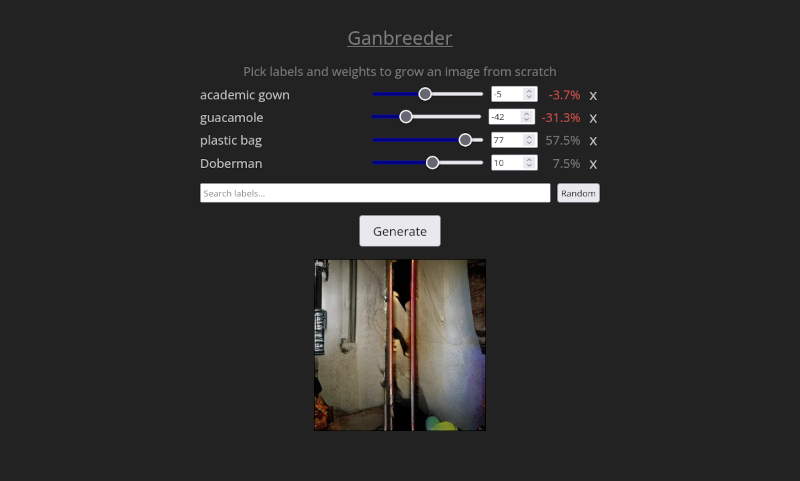
additionally, and this is way more exciting! you can create images from scratch as well as edit the genes of preexisting images, like in artbreeder! this includes negative weights, which might behave a little weirdly when generating children. here's a list of genes, sorted by artbreeder category.
finally, you can expand images (that's not quiiite exactly what's going on, they explain it here) and make them tileable. expanded images can still have children (via all methods — parthenogenesis, breeding and gene editing), but they'll be the regular 256px squares.

okie that's all from me, read on for their commentary on the process and stuff :)
After the manifesto jam my friend sol mentioned they'd like to host a jam focused on the use of a generative AI from before the LLM explosion. They've always been a fan of ganbreeder and suggested that the main model recommended for the jam could be BigGAN with the old ganbreeder UI and user experience. But earlier this year when we tried to install their local version from the source code we had a lot of trouble... (sol.... i'm sorry for completely fucking up your base python environment :(.), but in the end they managed to put together a relatively easy-to-install-locally version. We talked briefly afterwards about how it might be possible to create a more accessible version with a single executable, and i started. to have. ideas.
I had already given the project's original source code a general look before and the things that bothered me the most were 1) the OP made two backend servers with two different technologies. one for operations on the model in python with flask (a pretty lightweight library for creating API endpoints in python) and one in nodejs to handle all the calls from front to back (including calling the python endpoints). 2) the creation of a postgres server and database just to manage a single table that stored image metadata. 3) the fucking .pug files, my man in christ what is this.
I don't think it's fair to judge the OP for these decisions. I think the goal of the software he was making was meant to be something quick, that could be used collaboratively by lots of people on a website (which eventually became artbreeder). That's why i think a lot of the decisions were made with the intent of the project being hosted on an EC2 and with an external database etc. And not something meant to be run locally.
What i wanted with the rewrite was to fix those things that bothered me. The first thing i did was remove all references to node and do the whole backend straight in python with flask, served with waitress as the WSGI server. With that i now had to rewrite how the back interacts with the database. I took the opportunity to also strip out the entire postgres setup to use one of my favorite pieces of software, sqlite. besides often offering reads even faster than the filesystem itself, it comes already installed in python, and is part of its standard library(!!!). with that i killed two birds with one stone, removed an annoying dependency to install and set up and simplified the code. Another change i made was rewriting the whole part that used an ORM in the javascript code to be just a written SQL query called directly inside python. No shade if you like ORMs, i understand why they exist, but 1) i didn't want to add yet another dependency with SQLAlchemy or some other library 2) in general i prefer to write the SQL queries straight into the code, since in the end that's what the ORM does just with syntax sugar.
The last point left was now to remove the .pug files. Since the project already uses flask, which interacts really well with jinja, i decided to just write the pages in html with the dynamic generation parts in jinja expressions that get rendered when the page is called. The last thing on the front were the calls it made to the back - i decided to leave those in javascript, since that's its god-given function.
One last extra change i decided to make was translating the code that interacted with the model from TensorFlow to PyTorch. I did this because 1) I feel like TF has been used less and less and that these days it's more of a secondary deep learning library, with Pytorch becoming the main one. This gives me a (false) comfort that the development version of the code can last longer before the dependencies eventually break. 2) I found it easier to import and use the pre-trained model with the format accepted by PyTorch than the TF one, again with a false hope that this makes the repository's code more durable, or at least easier to fix. Since these are the heaviest libraries, they're the ones that carry the most risk of breaking in the future. I tried to "armor" the code as much as possible now using my (beloved) uv with a frozen version that should guarantee that every time you install the dependencies they'll be in the version i used. But as i myself was surprised when we couldn't get it working in the original repo, who knows what's going to happen with software (and the lifecycle of its objects) over the next 10, 20 years.
I think that sums up my technical decisions and why i made them. Personally i think the code ended up much easier to understand (since i'm the one who wrote it maybe that's not necessarily true), but i recommend you take a look at the source code. I think if you understand a bit of python, you'll be able to get the general gist of the thing. I recommend starting with app.py since that's where all the endpoints are. the db.py is good for understanding how i'm using sqlite and the database interactions and the gan.py for understanding how i use the model!